 Beer Appear
For busy walk-up bars
More rounds. Shorter lines.
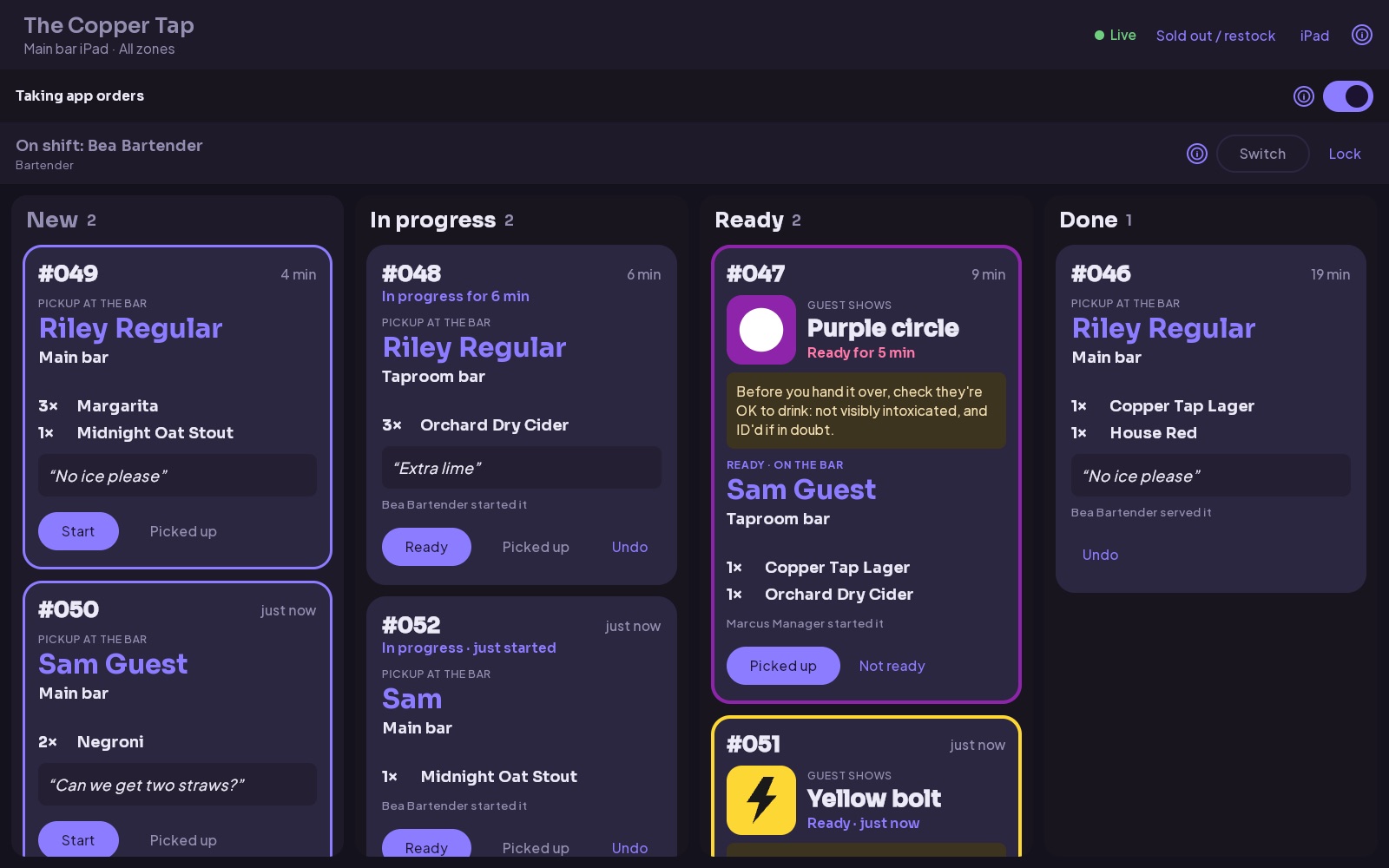
Guests tap a tag, order and pay from their phone, then pick up at the bar. The order appears on your bar station, an iPad or tablet behind the bar, already paid, once the guest is at the bar to collect it, and the money goes straight to your bank.
30-day pilot on one bar · 2% per order, nothing up front · No monthly fee, no contract
The problem
A packed bar loses rounds it never even sees
Every guest who can't catch a bartender's eye is a round that quietly doesn't happen. Beer Appear lets them order the moment they want one, wherever they're standing.
Without a tag
- Guest wants another round
- Waits to catch a bartender, or queues at the packed bar
- Minutes tick by and the moment passes
Some guests give up. That round, and the tip, never happens.
With Beer Appear
- Taps a tag on the bar or nearby
- Orders and pays on their phone, no line
- Picks up at the bar when their phone says it's ready
Round captured, staff time saved.
Is it right for your bar?
Made for the bar that's three deep on a Friday
Beer Appear earns its keep where the line at the bar is what limits your sales: guests walk up to order, and on busy nights your bartenders spend as much time ringing up orders and running cards as pouring.
A great fit
- Guests order at the bar. Walk-up and standing-room bars, where people go to the bartender rather than wait for a server.
- Packed on busy nights. People wait to get served, and some give up before they do.
- You ID everyone at the door. Nobody under 21 is inside while app orders are on, so nobody needs carding at the moment they order.
Sounds like your bar? Start a pilot on one bar.
Less of a fit
- Servers take most orders. Restaurants, table-service bars and beer halls already have someone taking the order, so there's little line to shorten.
- 18+ nights or all-ages shows. App orders are only for nights when everyone inside is 21 or over. Keep them off the other nights.
- Quiet most nights. If guests can always catch a bartender's eye, there are few lost rounds to win back.
Not sure? Ask us and we'll tell you honestly.
Why Beer Appear
Built for how bars actually run
Take the ordering off your staff's plate on a busy night, without changing how they make drinks.
Never miss a thirsty guest
Guests order the moment they want another, not when they finally catch someone's eye. Nobody has to queue at a packed bar.
Poured when they're there to collect
Orders reach the bar station when the guest taps in at the bar, so nothing gets poured and left to go flat. Their phone and your screen show the same symbol, like an orange star, so the right drinks reach the right guest.
Paid before it's poured
Apple Pay, Google Pay and cards through Stripe. No walkouts, no open tabs. Money lands in your bank on Stripe's normal payout schedule.
Your menu, live
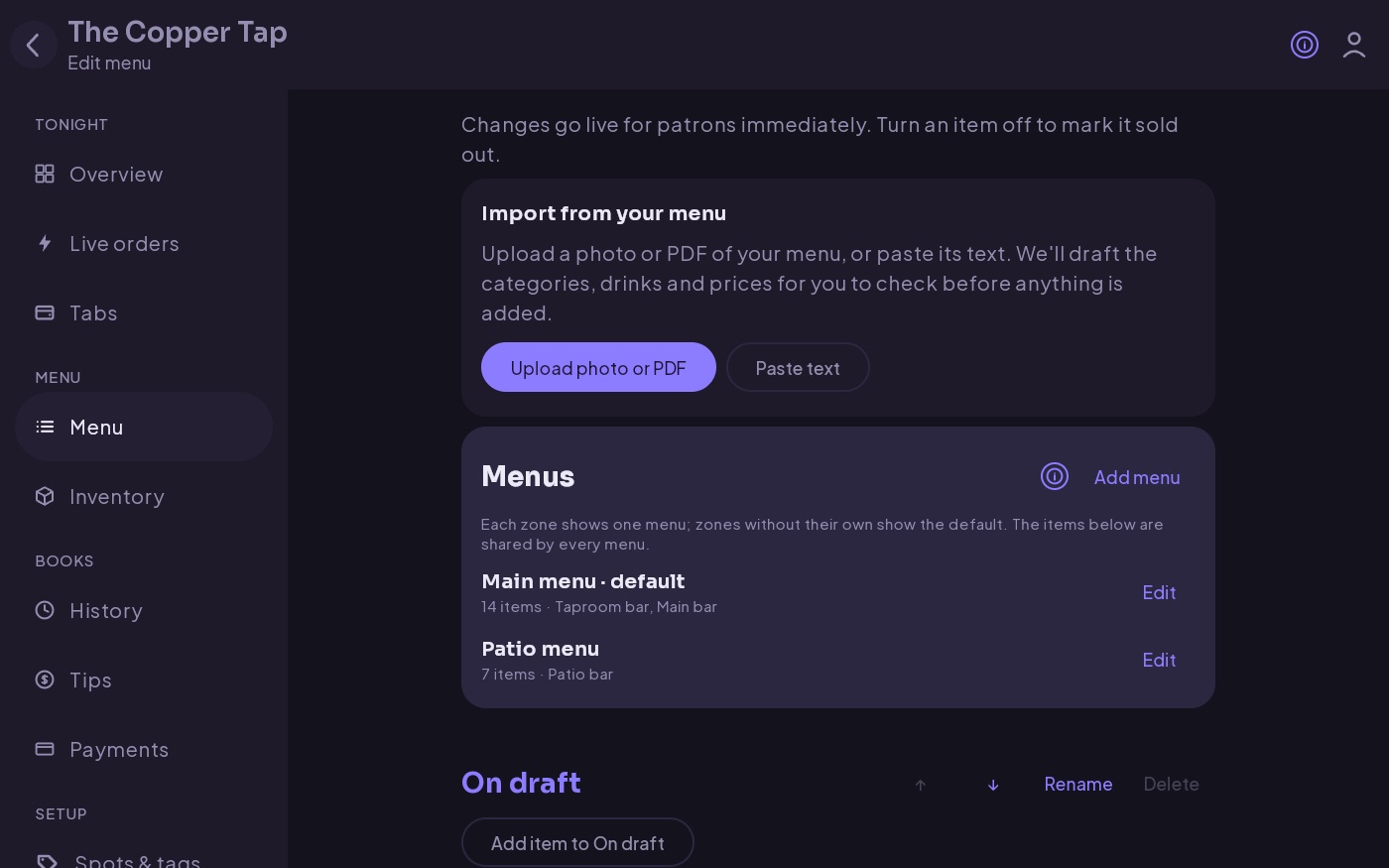
Edit drinks and prices from the dashboard, and schedule specials like happy hour. When a keg kicks, a bartender marks it sold out and guests see it right away.
The right station gets the order
Split your floor into zones, like the main bar and the patio bar. Each bar station only gets orders from its zones, and guests can't order from a zone nobody's covering. Give a station a cap on open orders, and app orders pause for a few minutes when the team's swamped.
See how the night's going
Your overview shows what's live, which stations are online, and anything left to set up. History shows sales and refunds, and Tips works out each person's tip-out for the night.
Your team
Everyone gets exactly what they need
- Bartenders tap their name on the bar station and enter their PIN, then start orders, set them out on the bar and mark them picked up. They can flag items sold out too.
- Managers also edit the menu, refund orders, add bar stations, run specials, and see order history and tips.
- Owners also set up zones and NFC tags, manage the team, set the tip rules, and connect payments.
Everyone has their own account and PIN, so you know who served what, and you can remove access the moment someone leaves. Orders are worked on the bar stations or by your bartenders and managers; as an owner, from home you can watch, not start orders.
Tips
Tips built in, and cheaper to process
Guests add a tip right where they pay, so your staff get more of it and you don't pay a second card fee to collect it.
- One payment, one fee. The tip is charged with the order, so Stripe's flat 30¢ is only paid once. A separate card charge for the tip would cost another 30¢.
- A lower effective rate. The same flat fee is spread over a bigger total, so your fee as a share of every dollar guests pay goes down.
- No Beer Appear fee on tips. Our 2% is charged on the order, never on the tip.
- Every tip is tracked. Each order records who made it and who handed it over, and the Tips page works out each person's share for the night.
- Your rules. Give each order's tip to whoever served it, pool them, or set fixed tip-outs like 10% to the barback.
Example: a $20 round with a 20% tip
| Order | $20.00 |
| Tip | $4.00 |
| Guest pays | $24.00 |
| Stripe fee on the order | $0.88 |
| Extra Stripe fee for the tip (2.9%) | $0.12 |
| Stripe fee as a share of the total | 4.15% |
Without the tip, the same order pays 4.40%. Tips are paid out to you with the order and are yours to pay out to staff.
Example: three $20 rounds
| Guest orders | $60.00 |
| Stripe fees, paying each round (3 × $0.88) | $2.64 |
| Stripe fees, on one tab (2.9% + 30¢) | $2.04 |
| Saved on this visit | $0.60 |
Beer Appear's 2% is the same either way. The saving comes from paying Stripe's flat 30¢ once instead of three times.
Tabs
Open a tab, pay one fee
Guests start a tab at checkout and keep ordering. Their card is charged once at the end, so a long night costs you one flat fee instead of one per round.
- Lower fees on every visit. Stripe's 30¢ is charged once per tab, not once per round. The more rounds a guest orders, the more you save.
- Bigger nights. With no card to tap or check to wait for, guests order another round more readily.
- Charged automatically. The card is charged when the guest closes the tab, after a quiet spell, or at closing time, with the tip you set for tabs that close on their own. Nobody chases a check.
- You set the limit. Choose the tab limit, or turn tabs off entirely.
Pricing
Simple, per order. No monthly fee.
You only pay when guests order through Beer Appear. Fees come out of each payment automatically, so there are no invoices.
Beer Appear fee
of each order, never on tips, plus Stripe's standard card processing fee (in the US, 2.9% + 30¢ per payment; see Stripe's pricing). Refunded orders refund our fee too.
- No setup fee, no monthly fee, no contract
- Unlimited tags, zones, staff and stations
- You're the merchant: your name on guests' statements
Example: a $20 round
| Guest pays | $20.00 |
| Stripe processing (2.9% + 30¢) | −$0.88 |
| Beer Appear (2%) | −$0.40 |
| Paid out to you | $18.72 |
Tips are included in what the guest pays and are paid out to you with the order. How tips lower your effective fee.
What you'll need
Just four simple things
An iPad or tablet
For the bar station behind the bar. An iPad, Android tablet or any computer with a browser works.
NFC stickers
A few along the bar, plus some around the room for ordering ahead. Standard NTAG213/215 stickers are inexpensive and easy to find.
See a sample tag and design your own →A phone with NFC
To write the stickers: any recent iPhone or Android phone.
About an hour
Your menu from a photo or your website, then your tags, a bar station and about 10 minutes with Stripe. Your team can help.
Get started
From sign-up to first order
Not ready to commit the whole place? Start with a 30-day pilot on one bar. You pay the usual 2% per order and nothing up front. If it doesn't earn its keep, walk away. Your dashboard's overview tracks each step below and shows what's left.
-
Tell us about your bar 2 min
Fill in the form below with your bar's name and your email, plus a link to your website or menu if you have one. We'll email you a link to set up your bar, usually within a day: sign in with Apple, Google or email, name your bar and accept the bar agreement, and you're its owner.
-
Build your menu ~10 min
If you sent us your menu, we'll have drafted it before you sign in, and it's waiting in your menu editor. Otherwise upload a photo or PDF of your menu, or paste its text, and Beer Appear drafts your categories and drinks with prices, sizes and ABV. Check the draft, add it, and change anything at any time.
-
Add zones and NFC tags ~20 min
Your bar starts with a Main bar zone and two tables, enough for a pilot. Add a zone for each other bar guests collect from (e.g. "Patio bar") and turn on Pickup at the bar. Add a spot for each tag, tap Write a tag on your phone and hold a sticker to it, then stick it on the bar. Standing inside, tap Use where I am now under Bar location so guests nearby can order on their way in.
-
Invite your team 5 min
Add bartenders and managers by email and choose each person's role.
-
Set up a bar station
Under Setup ▸ Stations, tap Add station, pick the zones it serves and tap Get code. On the iPad or tablet behind the bar, open Beer Appear, choose Set up as bar station and enter the code. Leave it on; your staff switch in with their PIN.
-
Connect payments with Stripe and go live ~10 min
Last, open Payments ▸ Set up payments. Stripe asks for your business details and bank account. If you already use Stripe, sign in with that account. Once Stripe can take payments, a bar station is online for a zone and your staff have confirmed on it that they're checking IDs at the door tonight, guests in that zone can start ordering.
Questions from owners
Before you sign up
Can I try it before committing my whole bar?
Yes. Start with a 30-day pilot on one bar. You pay the usual 2% per order, with nothing up front and no contract. Add the rest whenever you're ready, or stop with no obligation.
Do my guests need to download anything?
No. On iPhone the tag opens an instant App Clip; on Android and everything else it opens in the browser. No account needed either: guests pay with Apple Pay, Google Pay or a card. They sign in only to run a tab.
Who gets the money, and when?
You do. Payments go to your own Stripe account, which pays out to your bank on Stripe's schedule. Beer Appear's 2% is taken out automatically; there's nothing to invoice or reconcile.
Can I use my existing Stripe account?
Yes. During payment setup, sign in to the Stripe account you already have instead of creating a new one.
What happens when something runs out?
Any bartender can switch an item to "sold out" from the bar station. Guests see it instantly and can't order it.
Can I limit when and how much guests order?
Yes. Set the hours app orders are taken (overnight hours work too), cap drinks per order, and limit alcoholic drinks per guest over a time window. Mark which menu items contain alcohol and set separate sales tax rates for alcoholic drinks and everything else; tax is added at checkout.
Can I run happy hour or other specials?
Yes. Set a special price, an amount off or a percent off for chosen drinks or whole categories, on the days and times you pick (past midnight works too). While it's on, guests see the special price and when it ends, and that's what they pay.
Does it track inventory?
Yes, for the items you choose. Enter how many servings you have; every paid order takes its drinks off, guests see "Only 3 left" as you run low, and at zero it shows as sold out. Record restocks, counts and waste, and see every change with who made it.
Can guests run a tab?
Yes. Guests can start a tab at checkout: their card is held, they order as many rounds as they like, and they're charged once when they close it, or automatically after a quiet spell or at closing time. That's one card payment per visit instead of one per round, so you pay Stripe's flat 30¢ once (see the savings). You choose the tab limit, and whether guests can choose, must use a tab, or always pay per round. A tab left open closes with the tip you set for it (18% unless you change it), which guests see before they open one.
How do tips work?
Guests add a tip when they pay, and it goes to your Stripe account with the order. Because every order records who made it and who handed it over, the Tips page works out each person's share for the night. Give each order's tip to whoever served it, or pool them. You can also set fixed tip-outs, like 10% to the barback.
What if a guest pays and never comes to the bar?
Their order goes to the bar station anyway after 30 minutes, so it's never lost. Guests who ordered standing at the bar can tap I'm at the bar now instead of the tag.
Can staff bring drinks to tables instead?
Yes. Pickup is set per zone. Turn it off for a zone and its orders show the table they came from, so staff can run them over. It pays off most where guests walk up to order, though: if servers already take orders at the table, there's less line for Beer Appear to shorten.
How do refunds work?
A manager or owner cancels the order from the dashboard. The guest is refunded to the card or wallet they paid with, and Beer Appear's fee is refunded to you as well.
What if a bar station goes offline?
Guests can't order from a zone unless a bar station for that zone is online, so no order goes unseen. Your overview shows which stations are connected.
Why only bars that card everyone at the door?
Guests order and pay from their phone, so nobody checks their ID at the moment they order. Beer Appear is for bars where everyone inside is 21 or over. You confirm that your bar IDs everyone at the door when you set it up, and each night whoever's working confirms it on the bar station before app orders open. If you have 18+ nights or all-ages shows, keep app orders off on those nights.
Can I turn app ordering off for a night?
Yes. When the bar station asks whether you're checking IDs at the door tonight, tap Not tonight, or tap Stop app orders at any time. Guests can still see the menu, and it tells them to order at the bar.
Is there a contract?
No. There's no monthly fee and nothing to cancel. Stop using it whenever you like.
Ready to shorten the line at your bar?
Start with a 30-day pilot on one bar: 2% per order, nothing up front, no commitment. Tell us your bar's name and we'll send you a link to set it up.